


Add Goumikids to Amazon Baby Registry (2026 Guide)

Adding Goumikids to your Amazon baby registry takes about five minutes once you know Amazon doesn't stock the brand directly, so you're not searching a catalog, you're pulling in outside items one by one. Instead of texting your sister ten Goumikids product links and hoping she buys the right size, set up Amazon's "Add Items You Find Anywhere" tool so every gown, mitt, and boot from Goumikids lands on your registry with the right image, price, and a note about size.
- Add Goumikids to your Amazon baby registry using Amazon's Add Items You Find Anywhere tool, not a product search.
- The Amazon Assistant browser button pulls Goumikids product images and prices fastest from a desktop.
- Amazon can't read size or color variants, so write those into the gift note before you share the registry link.
- Mobile add works too, but expect to type in the price and paste the image link yourself.
Why this matters
Goumikids sells through its own Shopify store, not through Amazon's marketplace, so there's no product listing for guests to click "add to registry" on the way you'd expect with a big-box brand. That's not a bug in your registry setup — it's just how the brand sells. The workaround Amazon built for exactly this situation is the universal registry add, and once it's set up correctly, gift-givers see the same clean listing as anything else on your registry.
Get this step wrong and you'll end up with a registry item that shows a broken image, a $0.00 price, or no size noted at all — which means someone buys the wrong thing or skips it entirely. Getting it right in 2026 means five minutes of setup now instead of a returns headache after the baby shower.
Before you start
- An active Amazon Baby Registry. If you haven't created one yet, do that first — the universal add tool only works inside an existing registry, not as a standalone bookmark.
- The exact Goumikids product page open in a separate tab, with the size and color you want already selected on the page.
- The gotcha: Amazon's tool pulls the image and price it sees on the page at that moment, but it does not read dropdown selections for size or color. If you add a gown while the page shows Storm Gray in newborn size, the registry entry will still just say "gown" — you have to type the size and color into the note field yourself, every time.
Add Goumikids items to your registry from a desktop browser
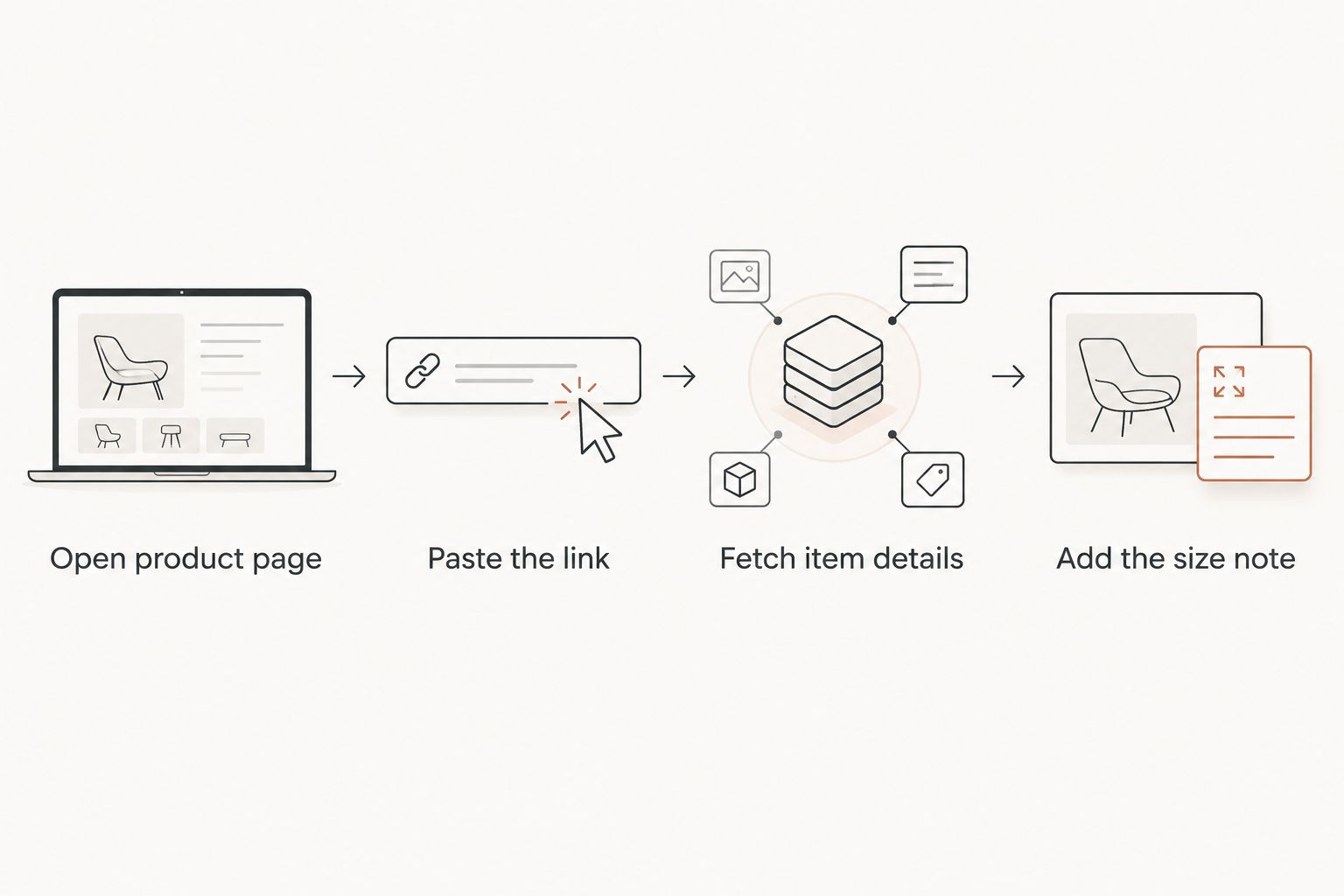
- Go to goumikids.pro and open the product page for the item you want — a convertible gown, a set of stay-on mitts, or a pair of boots.
- Select the size and color on the page so you can read them off before you add the item, since Amazon won't capture that part.
- Open your Amazon account in another tab and go to your Baby Registry dashboard.
- Click Add Items at the top of your registry, then choose Add an Item You Found Anywhere.
- Paste the Goumikids product URL into the field Amazon provides, then click Fetch Item Details.
- Amazon will pull the product image and title automatically. Check that the image matches the color you picked — sometimes it grabs the default swatch instead.
- In the Notes field, type the exact size and color you selected in step 2 (example: "Newborn size, Storm Gray").
- Click Add to Registry.
Expected result: the item shows up in your registry list with a working thumbnail, a price field you can edit if it pulled wrong, and your size/color note visible to anyone who clicks into the item.
Add Goumikids items from the Amazon mobile app
The mobile flow works the same way but with a couple of extra taps, since the app doesn't have a browser add-on to lean on.
- Open the Goumikids product page in your phone's browser and copy the link from the address bar.
- Switch to the Amazon app, open Your Registries, and tap Add Items.
- Tap Add a Product from Any Website and paste the link.
- If the image or price doesn't populate, tap Edit Details and enter them by hand — the price shown on the Goumikids page and a screenshot-quality image link both work fine here.
- Add your size and color note the same way as the desktop flow, then save.
Expected result: the item appears in your mobile registry view identically to how it'll show on desktop, notes included.
Update your registry as your baby grows
This is the second workflow worth setting up at the same time: Goumikids sizes run from preemie through toddler, and a gown or footie bought for a newborn size won't fit by month four. Instead of leaving one static registry, add a size range rather than a single size. Adding two sizes of the same convertible gown — one newborn, one 0-3 month — as two separate registry entries lets gift-givers pick based on when they're actually buying, not just when the registry was built.
Troubleshooting
- The image shows a broken link or placeholder icon. Amazon's fetch tool sometimes grabs a low-res thumbnail from a Goumikids product page's metadata instead of the main photo. Edit the item and paste a direct image URL from the product page instead.
- Price shows as $0.00 or blank. This happens when the product page has multiple price points (like a set vs. a single item). Enter the price manually in the edit screen.
- The item duplicates on your registry. This usually means it was added once from desktop and once from mobile using slightly different URLs (with or without a size parameter). Delete one and keep the version with your size note attached.
- Gift-givers say the size note isn't visible. Some registry sharing links hide notes by default — check your registry's privacy settings and make sure "Show notes to guests" is toggled on.
- The "Add an Item You Found Anywhere" button is missing. This tool only shows up once you've created at least one registry list. If you're still on the setup screen, finish creating the registry first, then the option appears.
Customize your registry
Once the basics are added, group items by what actually gets used first. Newborns go through mitts and boots faster than almost anything else because they're the pieces most likely to end up in the diaper bag, lost at daycare, or outgrown in six weeks — so registries that list two or three sets instead of one set tend to get filled out more evenly across gift-givers.

If you're also building out a Babylist registry alongside Amazon, the setup steps are close but not identical — worth reading through before you duplicate the work twice.
FAQ
Can you add Goumikids to an Amazon baby registry?
Yes. Use Amazon's Add an Item You Found Anywhere tool inside your registry dashboard, paste the Goumikids product URL, and Amazon pulls the image and title automatically.
Does Amazon capture the size or color of a Goumikids item automatically?
No. Amazon's universal add tool doesn't read dropdown selections on outside sites, so you need to type the size and color into the item's note field yourself.
Why does a Goumikids item show a $0.00 price on my registry?
This happens when the product page has more than one price point, like a set versus a single piece. Edit the item and enter the price manually.
Is it better to add Goumikids items from desktop or mobile?
Desktop tends to pull cleaner images and pricing on the first try. Mobile works fine too, but expect to edit the image or price by hand more often.
Can gift-givers see the size notes on registry items?
Only if your registry's privacy setting for showing notes to guests is turned on. Check that setting before sharing the registry link.
Should I add more than one size of the same Goumikids gown?
Yes, if the baby shower happens well before the due date. Adding a newborn size and a 0-3 month size as separate entries lets gift-givers buy based on timing.
What Goumikids items work best for an Amazon registry?
Mitts, boots, and convertible gowns are the items most families need in multiples, which makes them easy for several gift-givers to split without duplicating.
One last thing
The detail almost everyone skips is the size note — and it's the one detail that determines whether the gift someone buys actually fits by the time the baby arrives. A registry with ten Goumikids items and no size notes is guesswork for every guest who clicks through; a registry with three items and clear notes gets filled faster and fits right the first time.